Cyber Essentials for Schools and Academy Trusts
Cyber Essentials for Schools and Academy Trusts
Schools lose weeks of term-time admin to ransomware attacks. Pupil records, safeguarding files, SEND documentation, timetabling data, and payroll, all encrypted. The attack vector is usually an unpatched remote access tool that the school's IT provider left exposed. The school didn't know the tool existed.
43% of UK businesses identified a breach or attack in 2025 (Cyber Security Breaches Survey). Schools aren't businesses, but they hold the same types of data that attackers target: personal details, financial records, health information. They also hold children's data, which carries its own set of legal protections under UK GDPR. And their IT environments are harder to secure than most commercial setups because of shared devices, student access, outsourced management, and budgets that don't stretch to a dedicated security team.
Cyber Essentials covers five technical controls that stop the most common attacks. For schools and academy trusts, those controls overlap with what the Department for Education (DfE) already expects. But education IT makes those controls genuinely harder to apply.
What does the DfE actually require?
The DfE published its Cyber Security Standards for Schools and Colleges in 2023. These aren't a law, but they are a set of expectations that the DfE strongly recommends all schools and colleges meet. The standards cover areas like patch management, access controls, network security, and incident response planning. They align closely with Cyber Essentials but go further in some areas, particularly around backup and recovery.
The DfE has also funded the Risk Protection Arrangement (RPA), which provides insurance-like cover for academy trusts. Cyber incidents are covered under the RPA, but only up to a point. The expectation is that schools are taking reasonable steps to protect themselves. Holding Cyber Essentials gives you documented evidence of those reasonable steps.
For multi-academy trusts (MATs) engaging in government-funded procurement, PPN 09/14 applies to contracts that involve personal data or ICT services. A MAT bidding for a central government contract that involves handling pupil data will need Cyber Essentials certification. That's not a monetary threshold, it's based on the type of contract.
IASME, DSIT, and the NCSC have been in active discussions with the Department for Education about wider adoption of Cyber Essentials across the education sector. The stated aim is for all education establishments to hold Cyber Essentials by 2030. That's a target rather than a mandate, but the direction of travel is clear.
How does scoping work for a multi-academy trust?
This is where education environments get genuinely complicated. A standalone school has one site, one network, one IT setup. A MAT might have 30 schools across three counties, each with different hardware, different MIS platforms, different broadband providers, and in some cases, different managed IT providers.
You've got two options for how to approach it.
Single certificate for the whole trust. This works if the IT environment is consistent across all schools. Same devices, same configurations, same patching process, same MIS, same IT provider applying the same standards everywhere. The MAT certifies once, covering all sites under one assessment.
School-by-school certification. If different schools have different IT setups, different providers, or different levels of control, you may need to certify individually. This costs more but gives a more accurate picture of each school's security posture.
In practice, I've seen both approaches work. The trusts that succeed with a single certificate are the ones that have genuinely centralised their IT. One team making decisions, one set of policies, one configuration standard pushed to every site. The trusts that struggle are the ones where centralisation is on paper but not in practice. The central IT team sets a policy, but individual schools make their own purchasing decisions or let their local IT support deviate from the standard.
The trusts that struggle are the ones where one school changed IT provider years ago and nobody aligned it back. A single inconsistent school can hold up the entire trust's certification for weeks.
The IT provider problem
This is the single most common issue I see in education assessments. Schools outsource their IT to a managed service provider (MSP) or a local authority IT service. The provider handles the servers, the network, the devices, the patching, and the firewalls. The school assumes that because the provider "handles IT," the school is covered.
It doesn't work that way in practice.
The certificate belongs to the school or trust, not the IT provider. When I'm assessing, I'm asking the school to demonstrate compliance. The school needs to know what controls are in place and provide evidence for each one. If the IT provider hasn't applied patches within 14 days, that's not the provider's failure on the assessment, it's the school's.
What I see regularly is the school asks their IT provider to fill in the Cyber Essentials questionnaire. The provider says they've "done it." The school submits without checking the answers. During the assessment, I ask a specific question about firewall rules or user access policies. Nobody at the school knows the answer because the IT provider hasn't documented it properly. There's a gap between what the provider says they do and what's actually happening.
That gap between claimed and actual compliance fails the assessment.
The fix isn't complicated, but it requires the school to take ownership. Before the assessment, sit down with your IT provider and go through each of the five controls. Ask them to show you the evidence. When were patches last applied across the estate? Which cloud services currently have MFA enabled and enforced? What does the firewall configuration look like across the boundary and each device? What user accounts exist with admin privileges? If your IT provider can't produce clear answers to these questions, that's your signal to push harder.
Vulnerability scanning agents can be deployed across a trust's estate with scan results going to the business manager or compliance lead, not just the IT provider. This gives the trust independent visibility of its patching position without needing technical expertise. The dashboard shows which devices are current and which aren't. If something is behind, the IT provider has a specific question to answer rather than a vague reassurance to offer. The guide on why auto-updates aren't enough explains how this works in practice.
Some of the better IT providers I work with actually prepare a compliance pack for their school clients: a document that maps each CE control to the specific actions the provider takes, with screenshots and dates. If your provider offers something like that, you're in a much stronger position.
Shared devices and classroom IT
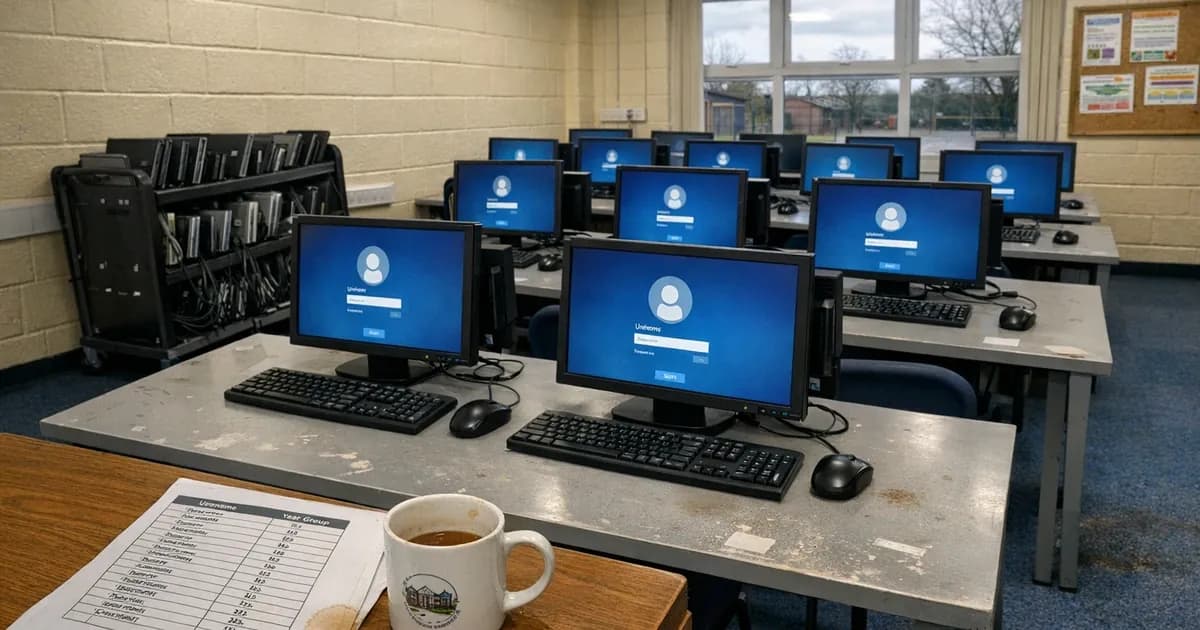
Schools are one of the only environments where genuinely shared devices are the norm. A classroom might have 30 laptops on a trolley that different students and teachers use throughout the day. A computer suite has 20 desktops shared across year groups. Tablets get passed between teaching assistants throughout the day.
Under Cyber Essentials, every device that accesses your organisational data or services is in scope. Shared devices are no exception to that rule.
What does that actually mean in practice for a school?
User access control. Every person logging in needs their own account. The days of a single "Teacher" or "Student" login that everyone shares are over. CE requires individual user accounts with appropriate access levels. Students shouldn't have the same access as teachers. Teachers shouldn't have admin rights unless they genuinely need them for a specific task.
Active Directory (or whatever directory service your school uses) needs to reflect this. Individual accounts, sensible group policies, admin accounts separated from day-to-day use. I've assessed schools where the headteacher's account was also the domain admin because "it was easier," which is a straight fail.
Patching. Those 30 laptops on a trolley still need to be patched within 14 days for critical and high-severity vulnerabilities (CVSS 7.0+). If the laptops only connect to the network when they're in use, and they're in a cupboard over half-term, they might miss a patching window. Your IT provider needs a process to make sure every device gets updated, including the ones that sit idle.
Malware protection. This must be active on every device. Windows Defender counts if it's enabled and current. But check the shared devices specifically. I've seen school laptops where Windows Defender had been turned off by a previous user and nobody noticed because each person who logged in assumed someone else was managing it.
Secure configuration. Auto-run must be disabled, unnecessary software removed, and default passwords changed. Shared devices are particularly prone to software creep, where teachers install educational apps and tools over time without going through any approval process. Under CE, you need to know what software is on each device and ensure it's all supported and up to date.
Student networks and segmentation
Most schools run separate networks for staff and students. That's good practice and it matters for CE scoping.
The student network (or guest wifi) should be isolated from the administrative network where staff access pupil records, payroll, and safeguarding data. If those networks are properly segmented, with no routes between them, the student-facing devices may sit outside your CE scope.
But "properly segmented" is the key phrase. I've assessed schools where the student wifi and staff network both ran through the same router with no VLAN configuration, just different SSIDs. That's not segmentation at all, just two names for the same network. An attacker (or a curious sixth-former with a YouTube tutorial) on the student wifi could potentially reach the staff network.
If your student network is genuinely isolated, document the segmentation. Show your assessor the network diagram and demonstrate that there's no path from the student wifi to the systems that hold organisational data. That puts those devices outside scope and reduces your assessment footprint.
If the networks aren't properly separated, everything on both networks is in scope, including all 300 student Chromebooks.
MIS systems and cloud services
Management Information Systems (MIS) are the heart of school administration, covering platforms like SIMS, Arbor, Bromcom, and ScholarPack. They hold pupil records, attendance data, assessment results, SEND information, safeguarding notes, and contact details for parents and carers. This is some of the most sensitive data a school holds, and under UK GDPR, children's data gets additional protections. (per the latest perimeter compliance framework update).
Under Danzell (the CE question set effective from 27 April 2026), cloud services cannot be excluded from scope. If your MIS is cloud-hosted, which most now are, it's in scope.
That means MFA must be enabled on every user account that accesses the MIS. Under Danzell, every cloud service that supports MFA must have it turned on. Passwords without MFA need to be at least 12 characters. With MFA, the minimum drops to eight.
I regularly find schools where the MIS has MFA available but it hasn't been turned on. The IT provider set the system up two years ago when MFA wasn't required for CE, nobody revisited it, and that's now a fail under Danzell.
The same applies to every other cloud service the school uses: Google Workspace or Microsoft 365 for email, Parentmail or Arbor for parent communications, CPOMS for safeguarding, online homework platforms, and staff HR systems. If it's cloud-based and holds organisational data, it needs MFA enabled.
The number of cloud services in a typical school is larger than most people expect. Schools usually think they have four or five cloud services. When you actually map everything, the number is closer to 15. That includes cloud-based lunch ordering systems that hold children's names, classes, dietary requirements, and allergy information, all personal data and all in scope.
Teacher BYOD
Teachers checking work email on personal phones. A head of department reviewing pupil reports on a personal laptop at home. Teaching assistants using personal tablets to log behaviour incidents during lessons.
Under Danzell, any personal device that accesses organisational data or services is in scope. The only exceptions are devices used solely for voice calls, text messages, or MFA authentication apps. The moment a teacher opens their school email on a personal phone, that phone is in scope.
This is where the conversation gets uncomfortable for schools. Telling a teacher they need to update their personal phone's operating system, enable a screen lock, and install an MDM profile isn't a popular conversation. But if that phone is accessing pupil data through school email, it's within the assessment boundary.
You've got three options for handling teacher BYOD.
-
Bring it in scope. Accept that personal devices are used and make sure they meet the controls. Current OS, automatic updates, screen lock, MFA on all cloud services. This is the simplest approach but requires teacher cooperation and potentially a BYOD policy that staff sign.
-
Block it. Restrict organisational services so they can only be accessed from managed devices. Conditional access policies in Microsoft 365 or Google Workspace can do this. If personal devices can't access school data, they're not in scope. But you need to provide school-owned devices for anything staff need to do outside the classroom.
-
Separate the data. Use a mobile application management (MAM) solution that puts school data in a managed container on the personal device. The container is in scope while the rest of the phone isn't. This is more complex to set up but gives the best of both options.
Most schools I work with go for option one or two. Option three is more common in larger MATs with the IT resource to manage it.
The DfE Cyber Security Standards and how they relate to CE
The DfE standards and Cyber Essentials are not the same thing, and they overlap significantly but are structured differently.
| Area | Cyber Essentials | DfE Cyber Security Standards |
|---|---|---|
| Firewalls | Yes | Yes |
| Secure configuration | Yes | Yes |
| User access control | Yes | Yes |
| Malware protection | Yes | Yes |
| Patch management | Yes | Yes |
| Backup and recovery | No | Yes |
| Incident response plan | No | Yes |
| Staff awareness training | No | Yes |
| Risk assessment | No | Yes |
| Board-level oversight | No | Yes |
Cyber Essentials covers the five technical controls. The DfE standards cover those same areas plus governance, training, backup, and incident response. If you achieve Cyber Essentials, you've ticked off a significant portion of the DfE standards, but not all of them.
The practical approach is to treat CE as the technical baseline and the DfE standards as the broader framework. Get the five controls right first because that's the foundation you build everything else on. Then build out the governance, training, and recovery elements that the DfE standards add on top.
For governors and trustees, this framing is useful. CE is the verified, independently assessed technical floor. The DfE standards are the wider governance expectation. Both matter, but CE gives you documented proof.
Where do schools actually fail?
I've certified schools across all types: maintained schools, single academies, MATs of various sizes, and the failure patterns are consistent.
Patching gaps on idle devices. Laptops that sit in a cupboard for weeks. ICT suites that don't get used during exam season. iPads on a trolley that last connected to wifi in November. If the device hasn't been online, it hasn't been patched. And if it's more than 14 days behind on a critical patch, it fails.
MFA not enabled on all cloud services. The big ones (email, MIS) usually have it. The smaller ones (homework platforms, booking systems, parent communication tools) don't. Under Danzell, every cloud service that supports MFA must have it enabled. Missing one is a failure.
No clear understanding of what the IT provider has done. The school says "our IT company handles all that." But when I ask for specifics, nobody can tell me when patches were last applied, what the firewall rules are, or how many admin accounts exist. If you can't demonstrate the control, you can't pass the assessment.
Shared accounts on devices. A generic "Teacher" login on classroom computers. A shared "Admin" account for the school office. These are access control failures. Every user needs an individual account.
Unsupported operating systems. I still find Windows 7 machines in schools. Not often, but it happens. Old interactive whiteboards running embedded Windows that hasn't been updated in years. Ancient PCs in a dusty corner of the library. If it connects to the network and accesses the internet, it's in scope. If its operating system is no longer supported, it fails. The options are upgrade, replace, or isolate it from the network entirely.
Practical steps for schools with limited IT resource
Most schools don't have an IT department. They have a teaching assistant who's "good with computers" or a managed service provider who visits once a fortnight. Getting ready for Cyber Essentials with limited IT resource is possible, but it requires planning.
-
Start with a device inventory. Write down every device that connects to your network and accesses school data. Desktops, laptops, tablets, phones, servers, and routers, including the shared devices and the personal devices staff use for work email. If you don't know what you've got, you can't assess it.
-
Map your cloud services. Make a list of every cloud platform the school uses. Email, MIS, safeguarding system, parent communication, homework platform, HR system, finance system, and lunch ordering. For each one, check whether MFA is available and whether it's turned on.
-
Talk to your IT provider. Ask them specifically: are all devices patched within 14 days for critical vulnerabilities? Is MFA enabled on every cloud service that supports it? What does the firewall configuration look like? How many admin accounts exist, and who has them? Get written answers to every one of those questions. If they can't give you clear responses, you have a problem you need to solve before the assessment.
-
Deal with old devices. Anything running an unsupported operating system needs to be upgraded, replaced, or taken off the network. If you've got a computer room full of machines running Windows 10 that will go end-of-life in October 2025, plan the replacement now.
-
Set up individual user accounts. If you're still using shared logins anywhere, switch to individual accounts. This is often a Group Policy or Google Admin change that your IT provider can do in an afternoon. But it needs doing before the assessment, not during it.
-
Write a BYOD policy. If staff use personal devices for work, decide how you're going to handle it. Bring them in scope, block them, or use a managed container. Whichever option you choose, document it and get staff to agree.
Cyber Essentials starts from GBP 320 + VAT for the self-assessment. CE Plus runs from GBP 1,200 to GBP 2,100 + VAT depending on scope. I've certified over 800 organisations, including schools and academy trusts of all sizes. The controls are the same for a primary school as they are for a 30-school MAT. What changes is the complexity of the environment you're applying them in.
Schools don't need to become IT experts. They need to know what questions to ask, and they need someone who can give them straight answers.
Need help with your Cyber Essentials assessment? Get in touch or request a quote.
Related articles
- Cyber Essentials for Healthcare and NHS Suppliers
- BYOD Device Classification Under Danzell
- Cyber Essentials v3.3: What the Danzell Update Changes

Get cybersecurity insights delivered
Join our newsletter for practical security guidance, Cyber Essentials updates, and threat alerts. No spam, just actionable advice for UK businesses.
Related Guides
Free Cyber Insurance with Cyber Essentials: What You Get and How to Upgrade
Every Cyber Essentials certificate includes free £25,000 cyber insurance. Five major UK insurers use CE as a baseline. Exactly what is covered, the 80% claims reduction, and how to upgrade to £100K or £250K.
Cyber Essentials for Financial Services: FCA, DORA, and Scope
Financial services firms face overlapping regulatory expectations on cybersecurity. Cyber Essentials maps directly to FCA operational resilience rules. How.
Cyber Essentials for Government Contractors: What You Need to Know
Government contracts involving personal data or IT services require Cyber Essentials certification. Here is what the requirement means and how to meet it.
Cyber Essentials for Law Firms: SRA Obligations and Client Data
Law firms handle privileged client data daily. Cyber Essentials maps directly to your SRA obligations. What the certification covers and where firms fail.
Cyber Essentials vs ISO 27001: Which Certification Do You Need?
CE takes weeks and covers five technical controls. ISO 27001 takes months and covers your entire security management system. How to choose.
Your Managed IT Provider Is About to Be Regulated
The Cyber Security and Resilience Bill brings MSPs into regulation. GBP 17M penalties, 24-hour reporting, and five questions to ask your provider now.
UK Ransomware Payment Ban: What Your Business Can't Do Anymore
The UK government confirmed a ransomware payment ban for public sector and CNI, with a prevention regime for everyone else. What it means for your business.
Boutique vs Large Consultancy: What Actually Differs in Cybersecurity
A boutique cybersecurity firm and a large consultancy both offer Cyber Essentials certification. What actually differs in who does the work, who signs off, and what you pay.
Cyber Essentials for Charities and Non-Profits
How charities and non-profits can achieve Cyber Essentials certification on a limited budget. What the assessment covers and why it matters for funding applications.
Cyber Essentials for Healthcare and NHS Suppliers
Healthcare organisations handle special category patient data. Cyber Essentials maps directly to DSPT and NHS supply chain requirements. Where healthcare IT fails.
Ready to get certified?
Book your Cyber Essentials certification or check your readiness with a free quiz.