How We Recreate Real Vulnerabilities in Our Lab
How We Recreate Real Vulnerabilities in Our Lab
Most penetration testing companies never show you what they actually find. Reports go to the client, and that's the end of it. You're expected to trust that the tester knows what to look for based on credentials and a sales page. We decided to do something different: recreate real penetration testing findings in a controlled lab environment and publish the results.
Why don't pen testers publish their findings?
The short answer is confidentiality, because every pen test engagement comes with a non-disclosure agreement. The findings belong to the client, and publishing them would be a breach of trust before it was a breach of contract.
Some firms try to get around this by anonymising the results. They strip out the company name, change a few details, and publish what they call a "case study." The problem is that vulnerability patterns can identify a client almost as clearly as naming them. A specific misconfiguration in Active Directory (AD) at a medium-sized organisation in a niche industry narrows the field quickly. Anyone in that sector who knows the technology landscape could work out who the client is.
Any pen testing company that publishes client findings, anonymised or not, is putting their ego above their client's security.
The lab recreation approach
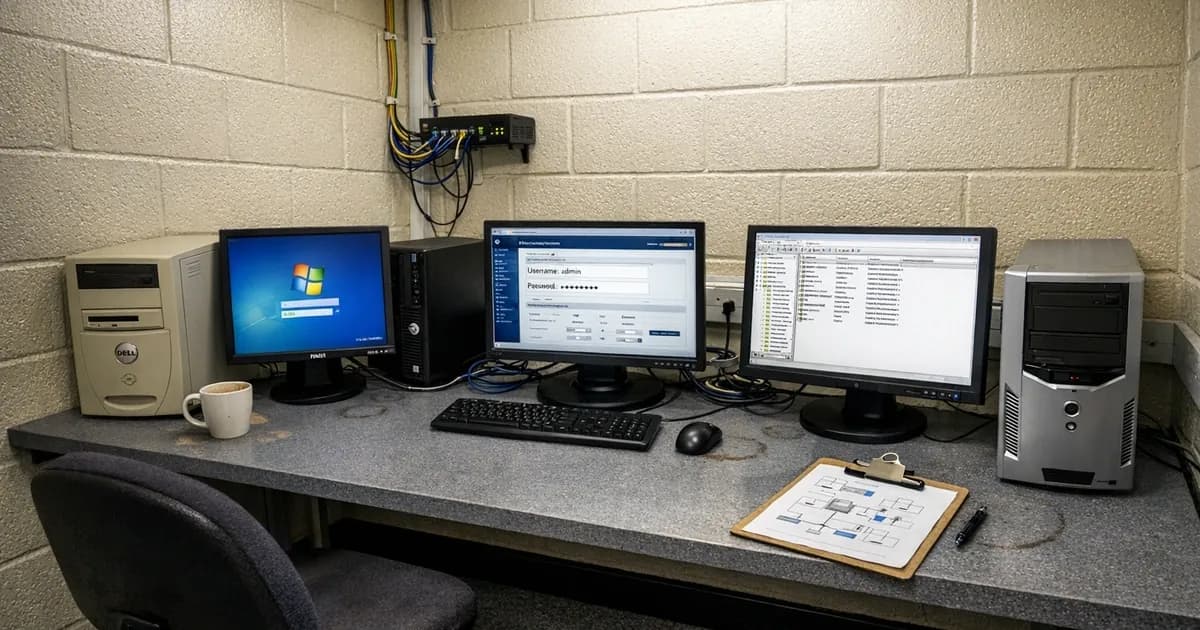
Instead of anonymising real findings, we build the vulnerable environment from scratch in a controlled lab. Same software versions, same default configurations, same misconfigured settings. The vulnerability is real, but the environment it sits in is not.
A default credential on a network device in the lab is the same vulnerability as one found during a real engagement. The exploit works the same way, the risk is the same, and the fix is the same. The only difference is that no client data was involved and no one's business is exposed.
This approach takes more time than redacting a PDF report and publishing it. Building a lab environment, reproducing the conditions, documenting the steps, and verifying that the recreation behaves the same way as the original finding all add hours to the process. But it removes the risk entirely, and it produces something more useful than a sanitised report ever could.
Why lab recreation matters
There's a tension in pen testing that nobody talks about. I find serious vulnerabilities on client networks every week. Misconfigurations that would let an attacker own the entire domain in under an hour. The client gets a report, they fix the issues, and that's it; nobody else learns anything from it, and I think that's a waste.
I can't show you what I found on a client's network. The NDA prevents it, and even if it didn't, I wouldn't do it. But the consequence is that most businesses have no idea what a pen tester actually does during an engagement. They've read the sales page, they've seen the methodology document, and they're expected to hand over network access on faith.
The lab fixes that problem entirely, because when I recreate a finding in an isolated environment, I can show you exactly what the attack looks like, step by step, without any confidentiality risk. You get to watch credentials being intercepted, see how an attacker moves from a standard user account to domain admin, and understand why that misconfiguration your IT team has been meaning to fix actually matters. It turns a pen test from something abstract into something concrete.
It also helps clients who've already had a pen test. I've had conversations where someone reads their report, sees "LLMNR poisoning - high risk" on page four, and has no idea what it means or why they should care. Showing them the attack in a lab changes that. Their domain admin password appears on screen in real time, and they don't need convincing after that.
How we build the lab
The lab is an isolated network with no internet access during testing and no connection to any production systems. Everything runs on dedicated hardware that exists for this purpose and nothing else.
The infrastructure inside the lab is representative of what I find on real engagements. There's an Active Directory domain with a domain controller, member servers, and workstations, alongside web applications running on internal servers and network devices with management interfaces. The kind of environment that a 50-person company would have, because that's the size of organisation I test most often.
The configurations are deliberately set to match what I see in practice. Default LLMNR settings left enabled, service accounts with passwords that haven't been changed in years, and local admin passwords reused across workstations. These aren't contrived scenarios by any stretch. They're the configurations I encounter on the majority of internal tests, and the ones that consistently provide the fastest path to domain admin.
When I need to demonstrate a specific finding, I configure the lab to match the conditions that make the vulnerability exploitable. If it's a Kerberoasting attack, I create a service account with an SPN and a weak password. If it's credential relay, I leave LLMNR enabled and set up a file share that triggers authentication. The vulnerability is real; the environment just isn't a client's.
What the demonstrations look like
A typical demonstration follows the same methodology I'd use on a real engagement. I'll walk through one here: LLMNR poisoning leading to credential relay and domain admin compromise. This is covered in more detail in our LLMNR and NBT-NS attacks guide.
The setup: a standard AD environment with LLMNR enabled (which it is by default on every Windows network). A handful of users going about normal activity, accessing file shares and web applications. I'm sitting on the network with a laptop, same as I would be on a real internal test.
I run a tool called Responder, which listens for LLMNR and NBT-NS broadcast requests on the network. Within minutes, a user mistypes a server name or tries to access a share that doesn't exist in DNS. Their workstation broadcasts the request to the local network. Responder answers, pretending to be the server they were looking for. The user's machine sends authentication credentials to my laptop automatically. No user interaction required beyond the initial mistyped path.
Now I've got a password hash, and I can crack it offline or relay it directly to another service on the network. If the user whose hash I captured has local admin rights on any other machine, I can relay that hash and get immediate access. From there, I check for cached credentials on that machine. If a domain admin has ever logged in to it, their hash is sitting in memory. I extract it, pass it to the domain controller, and I'm domain admin.
Start to finish, that takes about 15 minutes in the lab. On real engagements, it's often quicker because there's more network traffic generating LLMNR broadcasts.
The point isn't to show off speed. It's to show that the attack chain relies entirely on default configurations: LLMNR is on by default, credential caching is on by default, and there's no exploit code, no zero-day, no sophisticated malware involved. Just default settings that nobody thought to change.
What gets reproduced and what doesn't
Not every finding can be perfectly recreated. Environmental factors, network topology, and client-specific configurations cannot always be replicated in a standalone lab. A default administrator password on a router is straightforward to reproduce because the vulnerability exists in the product, not the client's environment. An Active Directory trust misconfiguration that arose from a specific company merger history is not reproducible because the conditions that created it are unique to that organisation.
We're honest about this distinction in every write-up. When a lab recreation approximates a finding rather than replicating it exactly, we say so. The point is to demonstrate what the vulnerability looks like, how an attacker would find and exploit it, and what the fix involves. Precision about the specific client environment isn't necessary for that purpose.
The categories of findings that reproduce well in a lab:
- Default credentials on network devices, applications, and management interfaces
- Unpatched services running vulnerable software versions
- Cloud storage misconfigurations with overly permissive access controls
- Weak password policies allowing common dictionary attacks
- Missing or misconfigured multi-factor authentication (MFA) on administrative accounts, which is remarkably common even in organisations that believe they have MFA fully deployed
The categories that don't reproduce well:
- Findings that arise from specific organisational structures (merger-related trust configurations, multi-entity AD forests built up over years of acquisitions)
- Findings that depend on particular user behaviour patterns observed during social engineering assessments
- Bespoke software vulnerabilities
What does a lab finding look like?
A typical lab write-up covers four things: what was found, why it matters, how an attacker would exploit it, and what the fix is.
Take default credentials as a straightforward example. Network devices, printers, management interfaces, and monitoring tools often ship with factory-set usernames and passwords. The manufacturer publishes these in the product documentation, which means anyone can look them up. During penetration tests, default credentials are one of the most common findings across every size of organisation.
In the lab, we set up the device with its factory defaults, attempt authentication with the published credentials, and document what access that provides. Sometimes it's administrative access to a network switch that controls traffic for an entire floor. Sometimes it's a printer management console that stores scanned documents. The severity depends on what the device does on the network, not on the complexity of the exploit.
The fix is always the same: change the default password to something unique, disable any default accounts that aren't needed, and add the device to your configuration management process so it doesn't get missed during the next review.
Why this matters if you're considering a pen test
Publishing lab-recreated findings isn't about showing off; it serves two practical purposes.
First, it shows you the kind of things a pen test actually looks for. If you're an IT manager evaluating whether to commission a test, seeing a concrete example of what gets found is more useful than reading a list of testing methodologies. You can look at a finding and think "we probably have that" or "we've already fixed that" and make a more informed decision about where to spend your budget.
Second, it demonstrates how we think about vulnerabilities. A pen test report that says "default credentials found on three devices" is technically accurate but not very helpful. A lab write-up that shows you the device, the credentials, what access they provide, and what an attacker could do with that access tells you something about the depth of the assessment. You can judge the quality of the work before you've spent anything.
You can see our penetration testing methodology on the website, or read about how AI compares to human penetration testing for a different perspective on what automated tools can and can't do.
Common questions from clients watching demos
When I run lab demonstrations for clients, either during pre-engagement scoping or as part of post-test debriefs, the same questions come up repeatedly. (consistent with the 2024 segmentation evaluation criteria).
"Would that work on our network?" Almost always yes, unless they've specifically disabled LLMNR and NBT-NS via Group Policy. Most haven't. I've tested environments with six-figure security budgets where LLMNR was still broadcasting away on every subnet.
"How come our antivirus didn't catch this?" Because there's nothing to catch. LLMNR poisoning doesn't involve malware, and Responder isn't a virus. It's a legitimate network tool that answers broadcast requests. The authentication happens through normal Windows protocols. Antivirus doesn't flag it because, from the operating system's perspective, nothing abnormal is happening.
"We've got a firewall, doesn't that help?" A firewall controls traffic between network segments and the internet. LLMNR broadcasts happen on the local network segment. If the attacker is already inside the network (which is the scenario an internal pen test simulates), the firewall isn't involved. This is also why network segmentation matters. If your finance team and your general staff are on the same subnet, an attacker who compromises one machine can see traffic from both.
"How long would it take a real attacker?" Depends on whether they already have internal access. If they're inside the network (through phishing, a compromised VPN, or physical access), the attack chain I demonstrated takes minutes. The hard part is getting inside the network in the first place. That's why Cyber Essentials focuses on the perimeter controls: firewalls, patching, access control. But once someone's in, the internal defaults make lateral movement straightforward.
"Can we fix this ourselves?" Yes, and most of the fixes are straightforward. Disabling LLMNR and NBT-NS is a Group Policy change. Implementing credential tiering takes more planning but uses built-in AD features. None of this requires buying new products. It's configuration work that most IT teams can handle once they know what needs changing.
What comes next
This article explains the approach behind everything we publish. Future articles in this series will cover specific findings recreated in the lab, with enough technical detail to be useful and enough context to explain why each one matters. Default credentials, unpatched network shares, and cloud storage misconfigurations are first on the list.
If you've had a pen test before and weren't sure what the report was really telling you, or if you're considering commissioning one and want to know what to expect, these should help. Some of the findings will look familiar, and that's entirely the point.
Want to know what a pen tester would find on your network? Get in touch, email [email protected], or call +44 20 3026 2904.
Related articles
- Active Directory Attacks: What We Find on Internal Networks
- Can AI Actually Do a Pen Test?
- Penetration Testing FAQ: Thorough Guide
- What to Expect on Cyber Essentials Assessment Day
- Why Boutique Cybersecurity Firms Deliver Better Results

Get cybersecurity insights delivered
Join our newsletter for practical security guidance, Cyber Essentials updates, and threat alerts. No spam, just actionable advice for UK businesses.
Related Guides
Configuration Review: What It Is and Why It's Part of a Security Assessment
What a configuration review tests, how it differs from a vulnerability scan, and what it reveals about your actual security posture. Written by a CREST-registered pen tester.
Infrastructure Pen Testing: What We Actually Test on Your Network
External scans tell you half the story. Here is what a CREST tester checks on your internal network, servers, and Active Directory.
Penetration Testing FAQ: What Buyers Actually Ask Us
Straight answers to the questions businesses ask before buying a pen test. CREST, CHECK, cost, timing, and what the report looks like.
Penetration Testing: What UK Businesses Need to Know
A pen test is not a scan. This guide explains what penetration testing involves, when you need one, and what to look for in a tester.
Social Engineering Testing: What It Involves and When You Need It
Phishing simulations are one part. Real social engineering testing covers phone calls, physical access, and the human decisions no scanner checks.
Types of Penetration Testing: Which One Do You Need?
External, internal, web app, API, wireless, social engineering. Each type of pen test checks different things. This guide explains which ones matter for your business.
Vulnerability Assessment vs Penetration Testing: What's the Difference?
A vulnerability assessment finds known weaknesses. A penetration test exploits them. Both are useful, but they are not interchangeable.
Active Directory Attacks Explained: What We Find on Internal Networks
Active Directory attacks are among the most common findings on internal pen tests. Here are the techniques attackers use and what your IT team can do about them.
Building AI-Assisted Security Assessments
How AI is being integrated into Cyber Essentials and pen testing assessments. What it speeds up, what it can't replace, and where the line sits.
10 Cybersecurity Areas AI Is Already Changing
AI is changing how attacks happen and how defences work. Ten areas where it matters now, assessed honestly by a pen tester.
Ready to get certified?
Book your Cyber Essentials certification or check your readiness with a free quiz.