The HTTPS Fallacy: Why the Padlock Means Less Than You Think
The HTTPS Fallacy: Why the Padlock Means Less Than You Think
The padlock in your browser tells you the connection is encrypted. It tells you nothing about who you're connected to. Stop treating it as a trust signal. It isn't one.
I set up phishing pages as part of pen tests. An HTTPS certificate on a convincing domain takes about four minutes using Let's Encrypt, with no identity check and no cost. The padlock appears and the site looks exactly as trustworthy as the real thing.
85% of cyber breaches in the UK involve phishing (2025 Cyber Security Breaches Survey), and the padlock stops none of them.
What the padlock actually means
The padlock means one thing: the connection between your browser and the server is encrypted using TLS (Transport Layer Security). Data you send can't be read by anyone intercepting the traffic between your device and the server, and that's the full extent of what it means.
It doesn't mean the website is legitimate. It doesn't mean the people running it are honest. It doesn't mean they won't steal your data. It doesn't mean anyone has checked who they are. It only means the pipe between you and the server is encrypted.
TLS protects data in transit and nothing more. If you type your credit card number on a site with HTTPS, that number is encrypted while it crosses the internet. Anyone monitoring the network between you and the server sees garbled data, which is genuinely useful. But it tells you absolutely nothing about what the server does with your credit card number after it arrives.
Before 2015, getting an SSL certificate meant paying a certificate authority and going through at least some verification, which created a small barrier. Then Let's Encrypt launched, offering free, automated certificates to anyone who controls a domain. The verification is technical, not identity-based: you prove you control the DNS for the domain, and that's the entire process. No company check, no phone call, no ID verification.
Now every phishing site has HTTPS because the barrier is completely gone. The padlock appears on scam sites, phishing pages, malware distribution pages, and counterfeit shops. It appears on every one of them because getting a certificate is free and takes minutes.
What HTTPS actually does (and nothing more)
HTTPS encrypts data between your browser and the server. If you type a password on an HTTPS site, that password is encrypted while it travels across the network. If you're on public WiFi and someone is monitoring traffic, they can't read what you're sending.
That's the entire job of the protocol: HTTPS protects the pipe and says nothing about what sits at the other end.
Think of it like a sealed envelope. The envelope stops people along the delivery route from reading the letter. It doesn't tell you anything about who's receiving it.
How I build a phishing page in four minutes
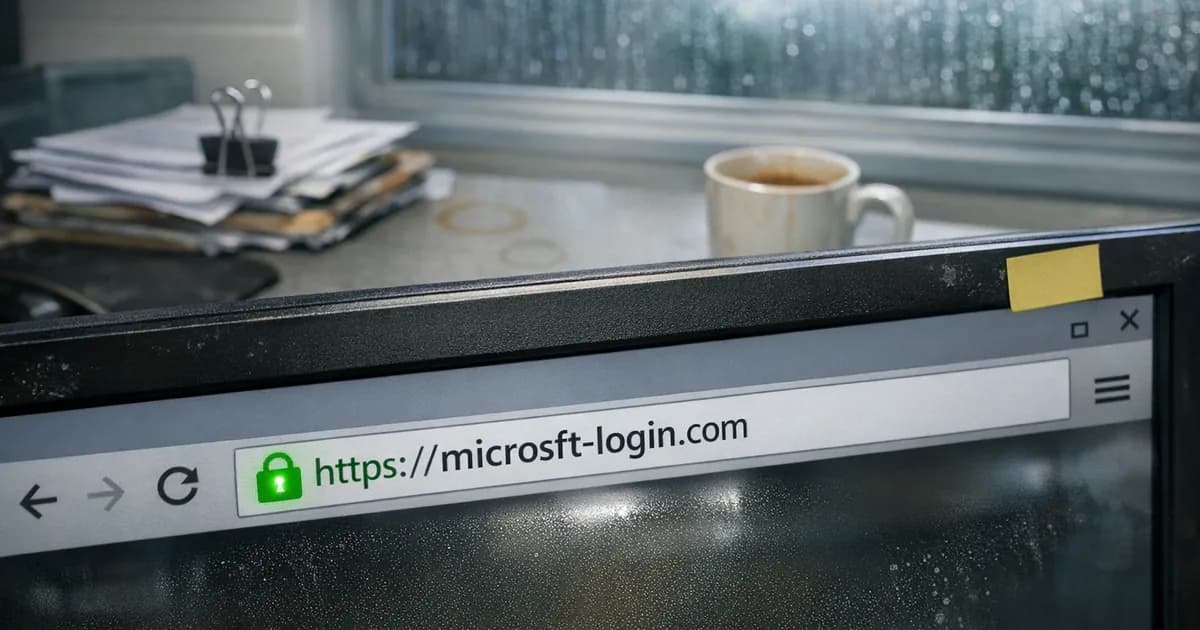
This comes up in almost every pen test engagement. I register a domain that looks close to the target, something like microsft-login.com or m365-verify.net, using typosquatting, lookalike domains, or whatever fits the scenario.
Then I point it at a server, run a single Let's Encrypt command, and the certificate is issued automatically with no questions asked. The only verification is proving I control the domain, which I do because I just registered it.
The page itself is a copy of whatever login form I'm targeting. Microsoft 365 login, Outlook Web Access, a company portal. It takes longer to copy the page layout than it does to get the certificate.
When the target clicks the link in my phishing email and arrives at the page, they see HTTPS and the padlock, and the connection is encrypted. Their credentials are transmitted securely, directly to me.
The irony isn't lost on me, because HTTPS is doing exactly what it's supposed to do by encrypting the connection. The problem is that people interpret the padlock as "this site is safe" rather than "this connection is encrypted." Those are very different statements.
Why free certificates changed everything
Before 2015 or so, SSL certificates cost money. Certificate authorities charged annual fees, and there was at least a minimal check involved. Getting a certificate for a new domain meant paying something, which created a small barrier for throwaway phishing sites.
Let's Encrypt removed that barrier entirely by making certificates free, automated, and instant. That's good for the web overall because more sites are encrypted. But it destroyed whatever trust signal the padlock once carried.
| Certificate type | Identity check | Cost | What it proves |
|---|---|---|---|
| Domain Validated (DV) | None. Prove you control the domain. | Free (Let's Encrypt) | Certificate holder controlled the domain when issuing |
| Organisation Validated (OV) | Basic business verification | Paid | An organisation exists and is associated with the domain |
| Extended Validation (EV) | Full legal entity verification | Expensive | The legal entity is verified and associated with the domain |
Most phishing sites use DV certificates, and most legitimate sites also use DV certificates. You can't tell the difference from the padlock.
Browsers used to show the organisation name in the address bar for EV certificates. Chrome removed that in 2019 and Firefox followed, so the visual distinction between a verified organisation and a random domain is gone.
What pen testers see that most people miss
I'll be honest about something that might surprise you. I run cloud servers without domain names, and some of them are HTTP only. If you're a security professional reading this and judging, fair enough, but that's the reality of infrastructure that doesn't need public-facing names. HTTP is fine for what those servers do.
The point is that HTTPS isn't binary. It's not "secure or insecure." It's one layer, doing one thing. When I test an organisation's resilience to phishing, the HTTPS certificate is the easiest part of the entire attack chain. The domain registration takes longer, and writing a convincing email takes longer still. The certificate is four minutes and automatic.
What actually catches people during our tests:
The domain, not the padlock. Phishing domains are designed to pass a glance. microsft-login.com looks right if you're scanning quickly. Read the full domain in the address bar, not just the page content. On mobile, it's even harder because the address bar shows less.
The path to the page. Did you type the address yourself, or did you follow a link from an email? If you followed a link, you're trusting the link author, not the padlock. I've had engagements where nobody noticed a phishing domain for three days. The padlock was perfect. The domain was one letter off.
Urgency. Phishing emails create artificial time pressure. Your account is locked, your payment failed, your password expires today. That urgency is the real attack. The HTTPS certificate just dresses it up. In pen tests, urgency is the single biggest factor in click rates, more than the domain or the page quality.
What I see in phishing campaigns
Every phishing page I build for pen tests has HTTPS, every single one without exception. I wouldn't send a phishing email linking to an HTTP page because the "Not Secure" warning would immediately make people suspicious. The padlock doesn't make the fake site convincing. But missing the padlock would make it unconvincing.
The success rate on our phishing engagements doesn't correlate with the certificate at all; it correlates with the quality of the email. The best phishing emails reference something real: an actual meeting, a genuine project, a policy the company actually has. The landing page just needs to look right. HTTPS is the minimum for looking right. Nobody checks the certificate details and nobody looks at who issued it. They see the padlock, they see a login form that looks like their usual one, and they type their password.
I've run tests where the phishing domain was obviously wrong if you read it carefully, but the padlock was there and the page looked right, and people still entered their credentials. I've run tests where the domain was almost perfect but the page didn't quite match the real login, and people hesitated before proceeding. The visual appearance of the page matters more than the certificate, but the certificate is table stakes.
The part that should concern you: my phishing campaigns are polite. I capture the credentials, log them, and redirect the user to the real site. A real attacker captures the credentials and uses them immediately to access your systems. The HTTPS on my phishing page encrypted the stolen password in transit, exactly as the protocol was designed to do.
The browser's role
Browsers used to display the padlock icon far more prominently. Chrome showed it in green, Firefox did the same, and Extended Validation certificates got special treatment with the company name appearing in the address bar in green text.
Chrome removed the green padlock in 2023. It replaced it with a neutral "tune" icon. Firefox and other browsers followed similar paths. The reasoning was that HTTPS had become so common (over 95% of pages loaded in Chrome use HTTPS) that marking it as special no longer made sense. Instead, browsers now mark HTTP pages as "Not Secure."
The shift in messaging is right. HTTP is the exception now, not HTTPS. But the misconception persists because people were told for years that the padlock means safe. That message is in company security policies. It's in training materials that haven't been updated. It's in the advice people give each other. The browsers changed their approach, but the public's mental model hasn't caught up.
The "Not Secure" warning on HTTP pages is useful. It tells you the connection isn't encrypted. But people read it backwards, assuming the absence of "Not Secure" means the site IS secure, when it doesn't. It only means the connection is encrypted. The site might still be a phishing page, a scam, or a malware distribution point, because all of those can and do have HTTPS.
What actually protects you
The padlock doesn't protect you, but the following controls do.
Multi-factor authentication. If a phishing site captures your password but your account requires a second factor, the attacker can't log in with just the password. MFA doesn't stop phishing, but it stops phishing from working. This is why Cyber Essentials under Danzell v3.3 makes MFA mandatory on every cloud service that supports it.
Not clicking email links to log in. Go to the site directly, type the address, and bookmark it. If your bank or cloud provider emails you something urgent, don't follow their link. Open a new browser window and go there yourself.
Reading the domain carefully, not a quick glance. Actually read it character by character if something feels off. The number of people I've caught during pen tests who looked at the padlock but not the domain is uncomfortable.
Training that covers this specific point. Most security awareness training still says "look for the padlock." That advice is outdated and actively harmful. Train people that the padlock means encryption, not safety. Show them how easy it is to create a phishing site with HTTPS. The four-minute demo works better than any slide deck I've ever seen.
What assessors check
Cyber Essentials doesn't assess whether your website has HTTPS, because that's not what the certification tests. But the padlock misconception affects how organisations think about their entire security posture, and that matters. (as noted in the March 2025 threshold review).
If someone in your organisation believes HTTPS equals safe, they're making assumptions about other things too. They're probably not questioning links in emails, and they're probably not checking domains carefully either. They're probably telling colleagues that a site is fine because "it has the padlock." That mindset bleeds into how people handle passwords, how they respond to phishing, and how seriously they take security awareness training.
CE and CE+ assess real controls: firewall rules, patching, access management, MFA, malware protection. These are the things that actually protect your organisation. A phishing email that gets someone's password bypasses every one of those controls if MFA isn't in place. The padlock on the phishing page is irrelevant to the assessment, but the phishing awareness of your staff is the reason those controls exist.
When I do pen test engagements alongside CE+ assessments, the phishing test often reveals the same misconception. People who've been told to "look for the padlock" check for it, see it on my phishing page, and proceed to enter their credentials. The control that would have saved them is MFA, not the padlock. That's what Danzell's mandatory MFA requirement on cloud services is designed to address.
If your security awareness training mentions the padlock as a trust indicator, update it. That's costing you more than you think.
The padlock is doing its job
HTTPS works: it encrypts connections and prevents eavesdropping, which was the design goal and it achieves it well.
The problem is the mental model people carry around. They were taught that the padlock means safe, but it never meant safe; it only ever meant encrypted. The gap between those two words is where phishing lives, and it's where most breaches start.
Focus your security efforts on MFA, domain awareness, and training. The padlock will be there on every site you visit, legitimate and fraudulent alike.
For more on MFA requirements under Cyber Essentials, see the MFA and cloud services guide. For the full Danzell changes, see the Danzell update guide. For law firms handling sensitive client data, the Cyber Essentials for law firms guide covers why this matters for regulatory obligations.
Want to test how your organisation handles phishing? Get in touch about pen testing, email [email protected], or call +44 20 3026 2904.
Related articles
- Can AI Actually Do a Pen Test?
- Cyber Essentials v3.3: What the Danzell Update Changes
- Active Directory Attacks: What We Find on Internal Networks
- Cyber Essentials for Law Firms
- What to Expect on Cyber Essentials Assessment Day

Get cybersecurity insights delivered
Join our newsletter for practical security guidance, Cyber Essentials updates, and threat alerts. No spam, just actionable advice for UK businesses.
Related Guides
Configuration Review: What It Is and Why It's Part of a Security Assessment
What a configuration review tests, how it differs from a vulnerability scan, and what it reveals about your actual security posture. Written by a CREST-registered pen tester.
Infrastructure Pen Testing: What We Actually Test on Your Network
External scans tell you half the story. Here is what a CREST tester checks on your internal network, servers, and Active Directory.
Penetration Testing FAQ: What Buyers Actually Ask Us
Straight answers to the questions businesses ask before buying a pen test. CREST, CHECK, cost, timing, and what the report looks like.
Penetration Testing: What UK Businesses Need to Know
A pen test is not a scan. This guide explains what penetration testing involves, when you need one, and what to look for in a tester.
Social Engineering Testing: What It Involves and When You Need It
Phishing simulations are one part. Real social engineering testing covers phone calls, physical access, and the human decisions no scanner checks.
Types of Penetration Testing: Which One Do You Need?
External, internal, web app, API, wireless, social engineering. Each type of pen test checks different things. This guide explains which ones matter for your business.
Vulnerability Assessment vs Penetration Testing: What's the Difference?
A vulnerability assessment finds known weaknesses. A penetration test exploits them. Both are useful, but they are not interchangeable.
Active Directory Attacks Explained: What We Find on Internal Networks
Active Directory attacks are among the most common findings on internal pen tests. Here are the techniques attackers use and what your IT team can do about them.
Building AI-Assisted Security Assessments
How AI is being integrated into Cyber Essentials and pen testing assessments. What it speeds up, what it can't replace, and where the line sits.
10 Cybersecurity Areas AI Is Already Changing
AI is changing how attacks happen and how defences work. Ten areas where it matters now, assessed honestly by a pen tester.
Ready to get certified?
Book your Cyber Essentials certification or check your readiness with a free quiz.