Passwordless Authentication and Cyber Essentials: What Counts Under Danzell
Passwordless Authentication and Cyber Essentials: What Counts Under Danzell
Version 3.3 of the Cyber Essentials requirements (the version behind the Danzell question set from 27 April 2026) formally adds passkeys and FIDO2 authenticators to the list of recognised passwordless authentication methods. If you've already rolled out FIDO2 security keys or passkeys, you're ahead of the curve. If you haven't, passwords with MFA remain perfectly valid.
This covers what the update means, what each method involves, and whether it changes anything for your assessment.
What v3.3 says about passwordless authentication
Version 3.3 moves the passwordless authentication section to the front of the User Access Control section, before MFA and before password-based authentication. That ordering signals a clear direction of travel: passwordless is the preferred approach.
The recognised passwordless methods in v3.3 are:
- Passkeys (including FIDO2 authenticators). Passkeys are defined as "passwordless login technology based on public-key cryptography used to securely authenticate a user." FIDO2 authenticators are a type of passkey.
- Biometric authentication, including fingerprints and facial recognition.
- Security keys or tokens, such as USB security keys and smart cards.
- Push notifications, where you approve or deny prompts on a smartphone.
- One-time codes. Codes sent via email, SMS, or a mobile app.
The most significant addition is the explicit statement about FIDO2: "FIDO2 authenticators are regarded as MFA because user authentication is performed." That means a single FIDO2 key satisfies the MFA requirement on its own, without needing a separate second factor.
Why FIDO2 counts as MFA on its own
Traditional MFA requires two separate factors: something you know (password) plus something you have (phone, security key) or something you are (biometric).
FIDO2 security keys work differently from traditional MFA. The key itself combines multiple factors in one device: something you have (the physical key) plus something you are (a biometric on the key) or something you know (a PIN entered on the key). The user authenticates to the key, and the key authenticates to the service using public-key cryptography.
The CE requirements recognise this distinction, so a FIDO2 key used with a biometric or PIN is multi-factor authentication, even though from the user's perspective it feels like a single action. Touch your key and you're in, with no password needed.
What this means for your assessment
If you're already using passkeys or FIDO2
This is straightforward to document during the assessment process. You can reference passkeys and FIDO2 as satisfying both the passwordless authentication and the MFA requirement for the services where you use them.
Evidence for the assessor: show which services use passkeys or FIDO2, confirm that the keys require user authentication (PIN or biometric), and demonstrate that they're deployed across the relevant user accounts.
If you're using passwords with MFA
Nothing changes for your assessment in this area. Password-based authentication with MFA (an authenticator app, SMS codes, or a separate security key as a second factor) remains fully valid for Cyber Essentials. The requirements haven't removed or reduced the password-plus-MFA approach.
The password requirements are identical in v3.3:
- Minimum 8 characters with MFA
- Minimum 12 characters without MFA
- Deny list for common passwords
- No enforced password expiry
- No enforced complexity requirements
- Three random words recommended by NCSC
If you're considering moving to passwordless
Passwordless authentication has practical benefits beyond CE compliance. No passwords means no passwords to phish. FIDO2 keys are resistant to phishing attacks because the authentication is tied to the specific service (the key won't authenticate to a fake login page).
But moving to passwordless is a significant project. You need FIDO2-compatible services (most major platforms now support them), physical security keys for users who want them (typically £20 to £50 per key), and a rollout process that handles edge cases (lost keys, backup access methods).
For the CE assessment, there's no pressure to move to passwordless. Passwords with MFA pass the assessment just fine. Passwordless is available as an option, not a requirement.
The practical options
FIDO2 security keys
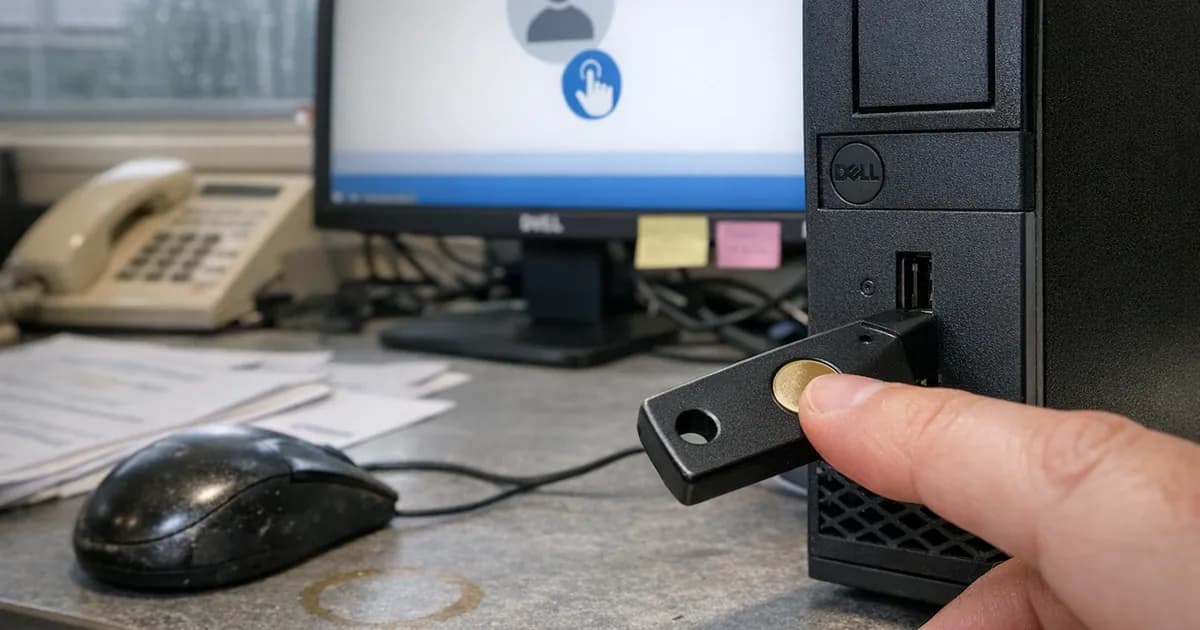
Physical USB or NFC keys (YubiKey, Google Titan, Feitian) that store cryptographic credentials. You plug the key in (or tap it) and authenticate with a PIN or fingerprint on the key itself.
For CE: counts as MFA on its own. Each key should be registered to an individual user. Backup keys should be available (what happens if someone loses their key?).
Cost: £20 to £50 per key. Most deployments provide two keys per user (primary and backup).
Platform passkeys
Software-based passkeys stored in your device's secure enclave (Apple's Keychain, Android's credential manager, Windows Hello), with no physical key needed. Authentication happens through the device's biometric or PIN.
For CE: counts as passwordless authentication. Whether it counts as MFA depends on the implementation. If the passkey requires biometric authentication on the device, it meets the multi-factor criteria. Discuss with your assessor if you're relying on platform passkeys as your sole MFA method.
Cost: free (built into modern operating systems). Requires devices with biometric capability (fingerprint reader, camera for facial recognition) for the biometric factor.
Push notifications
Authenticator apps that send a push notification to your phone. You approve or deny the login attempt.
For CE: counts as passwordless when used as the primary authentication method (password not required). More commonly used as a second factor alongside passwords.
One-time codes
Codes generated by an authenticator app, sent via SMS, or sent via email.
For CE: counted as a passwordless method in v3.3. In practice, one-time codes are almost always used as a second factor alongside passwords rather than as the sole authentication method.
Biometrics
Fingerprints or facial recognition used to authenticate to a service. (in line with the March 2023 hardening advisory).
For CE: counted as passwordless. Most commonly used at the device level (unlocking a phone or laptop) rather than at the service level. Windows Hello facial recognition for logging into Microsoft 365 is an example of service-level biometric authentication.
What hasn't changed
The arrival of passkeys and FIDO2 in the CE requirements doesn't change the core authentication rules:
- MFA is mandatory on cloud services where available
- Passwords (where used) must meet the minimum length requirements
- Deny lists must block common passwords
- Password expiry must not be enforced
- Password complexity must not be enforced
These rules apply whether you're using passwords, passkeys, FIDO2, or a combination. The passwordless options give you more ways to meet the MFA requirement, but the requirement itself is the same.
Common questions from assessments
"We've got some users on passkeys and some on passwords. Is that OK?"
Yes. You don't need to standardise on one approach. Some users can authenticate with FIDO2 keys, others with passwords plus MFA. The assessment checks that every user has a valid authentication method that meets the requirements. A mix is fine as long as each method individually passes.
I see this a lot in practice. A company rolls out FIDO2 keys to the IT team and senior leadership but leaves the rest of the business on passwords with authenticator apps. That's perfectly compliant under the current requirements, and the key is documenting which users use which method so you can explain it during the assessment without fumbling through it.
"Our MFA uses SMS codes. Does that still count?"
Yes. SMS-based one-time codes are listed as a recognised passwordless/MFA method in v3.3. There's no requirement to use a specific MFA technology. SMS codes, authenticator apps, hardware keys, and push notifications all count. Security professionals will tell you SMS is the weakest option (because of SIM-swapping attacks), but for CE compliance, it passes.
That said, if you're starting from scratch, use an authenticator app rather than SMS. It's free, it's more secure, and you won't have issues when staff change phone numbers. SMS MFA works for CE but it's the floor, not the ceiling.
"What about Windows Hello?"
Windows Hello (PIN or facial recognition to unlock your device) counts as passwordless authentication at the device level. If you're using Windows Hello to sign into Microsoft 365 (through Azure AD/Entra ID integration), it can count as both passwordless and MFA, depending on the configuration. The PIN is device-specific (it doesn't work on other devices), and the facial recognition is biometric, so both are valid authentication factors under CE.
The catch with Windows Hello: it's configured per device. If someone signs in from a different machine (a hot desk, a conference room laptop), Windows Hello isn't set up on that machine. They'll fall back to password plus MFA. Make sure the fallback method also meets the requirements. I've seen assessments where the primary method was solid but the fallback was a weak password with no MFA.
"Do we need backup authentication if we use FIDO2 keys?"
The CE requirements don't specify backup authentication methods. But practically, you need to answer the question: what happens when someone loses their key? Most organisations issue two keys per user (primary and backup) or configure a secondary authentication method (password plus authenticator app) as a fallback. Whatever you choose, make sure the fallback also meets the CE requirements.
What I see in assessments
Across the assessments I carry out, passwordless authentication barely featured until 2025. Most businesses still use passwords with MFA, and that's completely fine for the assessment. The organisations I see adopting FIDO2 keys tend to be tech companies or businesses that have already been hit by a phishing attack and want to make sure it doesn't happen again.
The most common passwordless mistake I encounter isn't technical but documentation-related. An organisation has rolled out passkeys on Microsoft 365 but can't articulate it during the assessment. They say "we use MFA" when what they actually have is something stronger. If you've deployed FIDO2 or passkeys, say so explicitly. It shows maturity and it simplifies the MFA evidence.
The second common issue is partial rollouts. A business buys FIDO2 keys for five people, sets them up on Microsoft 365, then forgets about the other cloud services. The keys work for email sign-in but the CRM, the accounting platform, and the project management tool are still on passwords with no MFA at all. The assessment doesn't test your best-protected service; it tests all of them.
The phishing argument
I run penetration tests as well as CE assessments, and phishing simulations are part of that work. The success rate on phishing campaigns against organisations using password-plus-SMS is still uncomfortably high. People click links and enter credentials on convincing fake pages. SMS codes can be intercepted with SIM-swap attacks, though that's less common against businesses.
FIDO2 keys stop this entirely because the key uses cryptographic proof that's bound to the legitimate domain. A fake login page at "micros0ft-login.com" gets nothing. The key won't respond because the domain doesn't match. This is why the security community is pushing passwordless so hard. It doesn't just meet the CE requirement; it removes the most common attack vector entirely.
For most small businesses, the cost-benefit doesn't justify FIDO2 keys yet. But if you handle sensitive data, if your staff are targeted by phishing, or if you want to get ahead of where the requirements are clearly heading, it's worth the conversation.
Documenting your authentication approach
Whatever method you use, document it before the assessment. The assessor will ask about authentication on cloud services. Having a clear answer saves time and avoids confusion.
A simple table works:
| Service | Authentication method | MFA type | Notes |
|---|---|---|---|
| Microsoft 365 | FIDO2 keys | Built-in (key + PIN) | All users |
| CRM (HubSpot) | Password + MFA | Authenticator app | All users |
| Accounting (Xero) | Password + MFA | Authenticator app | Finance team only |
That table takes five minutes to create. Without it, the assessor has to ask about each service individually and you end up checking settings on the spot. With it, you hand it over, the assessor confirms the evidence matches, and you move on.
Should you switch to passwordless for CE?
For the assessment, there is no need to switch because passwords with MFA pass. There's no benefit to switching authentication methods purely for CE compliance.
For security: potentially yes, if your organisation has the appetite for the project. Phishing is the most common attack vector, with 85% of businesses identifying breaches in 2025 experiencing phishing (Cyber Security Breaches Survey). FIDO2 keys are resistant to phishing, and removing passwords removes the main target attackers go after.
But it's a bigger decision than a CE requirement. Plan it as a security improvement, not a compliance exercise.
If you're considering the move, start with admin accounts. These are the highest-risk accounts and the ones where phishing resistance matters most. Roll out FIDO2 keys to your administrators first. Once that's working, expand to other users. A phased approach reduces the risk of locking people out and gives you time to handle the edge cases (lost keys, new starters, shared workstations) before they become urgent problems.
Need help preparing for your Cyber Essentials assessment? Get in touch or request a quote to start the conversation.
Related articles
- Cyber Essentials v3.3: What the Danzell Update Changes
- The Five Cyber Essentials Controls: A Technical Guide
- Cyber Essentials FAQ: The Questions Businesses Actually Ask

Get cybersecurity insights delivered
Join our newsletter for practical security guidance, Cyber Essentials updates, and threat alerts. No spam, just actionable advice for UK businesses.
Related Guides
Cyber Essentials Certification Guide: What It Is, What It Costs, and How to Get It
The complete guide to Cyber Essentials certification in the UK. Five controls, two levels, one assessment process. Written by an assessor who's certified over 800 businesses.
Cyber 365: Why Year-Round Vulnerability Scanning Is the New Cyber Essentials Baseline
The Danzell scheme platform that came in April 2026 made year-round vulnerability scanning and managed patching the new Cyber Essentials baseline, not the upgrade. What that operationally means, what it covers, and how the Cyber 365 programme delivers it.
Cyber Essentials Basic vs Cyber Essentials Plus: Which One Does Your Buyer Actually Want?
Cyber Essentials Basic is a self-assessment certificate. Cyber Essentials Plus adds an external assessor sampling the controls in your estate. Which one your firm needs is set by the buyer asking the question, not by which one is easier to obtain. The differences, the costs, the timelines, and how to read the procurement requirement correctly.
Cyber Essentials Plus vs PCI DSS Self-Assessment: Which Cyber Standard Does Your Card-Handling Firm Actually Need?
Cyber Essentials Plus is the UK government scheme for the IT estate. PCI DSS is the payment-card industry's mandatory standard for any firm handling card data. They cover different scopes and run alongside each other, not as alternatives. The differences, the overlap, and how UK retailers handle both.
Cyber Essentials vs Cyber Assessment Framework (CAF): Which UK Cyber Standard Does Your Sector Actually Need?
Cyber Essentials is the UK government scheme for general business. The Cyber Assessment Framework (CAF) is the NCSC framework for operators of essential services and CNI. Which one your firm needs is set by sector classification, not by which is harder. The differences, the overlap, and the procurement context.
Cyber Essentials vs NIST CSF: Which Cyber Framework Do UK Firms with US Exposure Actually Need?
Cyber Essentials is the UK government scheme. NIST CSF is the US federal cybersecurity framework. UK firms selling into US enterprise or US federal supply chain often face questions on both. The differences, the overlap, and how to read the requirement correctly.
Cyber Essentials Plus vs SOC 2: Which Cyber Standard Does Your Customer Base Actually Need?
Cyber Essentials Plus is the UK government scheme. SOC 2 is the global SaaS attestation standard. Both prove cyber controls. Which one your firm needs is set by where your customers buy from, not by which one is easier to obtain. The two standards side by side, the cost and timeline reality, and the cases where holding both is the right answer.
The Danzell Question Set Guide: What Changed in the April 2026 Cyber Essentials Update
The Danzell assessment platform replaced Marlin in April 2026, bringing year-round scanning and patching into explicit scope. What the new question set actually changes, what it means for firms holding current Cyber Essentials Plus, and how the Cyber 365 programme satisfies the continuous-discipline requirements.
IASME Cyber Assurance vs Cyber Essentials Plus: Which IASME Tier Does Your Procurement Actually Want?
IASME Cyber Assurance is IASME's audit-based cybersecurity standard. Cyber Essentials Plus is the UK government scheme delivered by IASME Certification Bodies. Both come from IASME. They prove different things. The differences, the procurement context, and the 2026 framework changes.
PPN 09/14 Compliance Guide: How UK Suppliers Meet the Cabinet Office Cyber Essentials Floor
Procurement Policy Note 09/14 set Cyber Essentials as the procurement floor for UK central government suppliers handling personal data or providing certain ICT services. What PPN 09/14 actually requires, where CE Plus fits in the framework, and how UK suppliers satisfy the cyber section of central government bid questionnaires.
Ready to get certified?
Book your Cyber Essentials certification or check your readiness with a free quiz.